
Skip to the content

BeSquares SupportBeSquares Support

  • Docs
  • Tickets
  • Create Ticket
  • Register
  • Login
  • Docs
  • Tickets
  • Create Ticket
  • Register
  • Login
  • Docs
  • Tickets
  • Create Ticket
  • Register
  • Login
  • Getting Started

    • Theme Requirements

    • Theme Installation

    • Theme Setup Wizard

      • Theme Plugins
      • Theme Importer
  • Theme Settings

    • Site Identity

    • General

    • Body Background

    • Header

    • Intro Header

    • Footer

    • Colors

    • Single Post

    • Typography

    • Blog

    • Treatments

  • Editor & Pages

    • Velura Blocks

    • Page Templates

  • Widgets

    • Available Sidebars

    • Theme Widgets

  • Advanced

    • NPM Commands

    • Helper CSS Class

  1. Docs
  2. Velura Theme
  3. Theme Settings
  4. Site Identity

Site Identity

Estimated reading time:
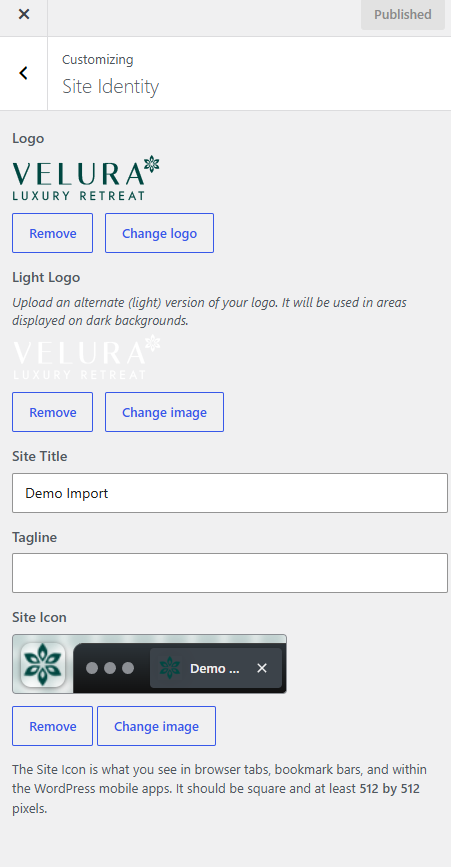
Site Identity

The Site Identity panel allows you to manage the core branding elements of your website. Below is a breakdown of the available settings:

  1. Logo: This defines the primary logo for your site
  2. Light Logo: This setting allows you to upload an alternate (light) version of your logo, which is designed to be used in areas of the site that are displayed on dark backgrounds.
  3. Site Title: A text field where you enter the main name of your website.
  4. Tagline: A text field intended for a short description or catchphrase for your site.
  5. Site Icon: This option manages your site's favicon. The Site Icon is the image displayed in browser tabs, bookmark bars, and within WordPress mobile apps.
Last update: October 2, 2026
Views: 56
How do you feel about this article ?
0 0 0
In this page:

    © 2026 BeSquares Support

    Powered by WordPress

    To the top ↑ Up ↑